Reference visual
Original customer-experience diagram rendered at full clarity.
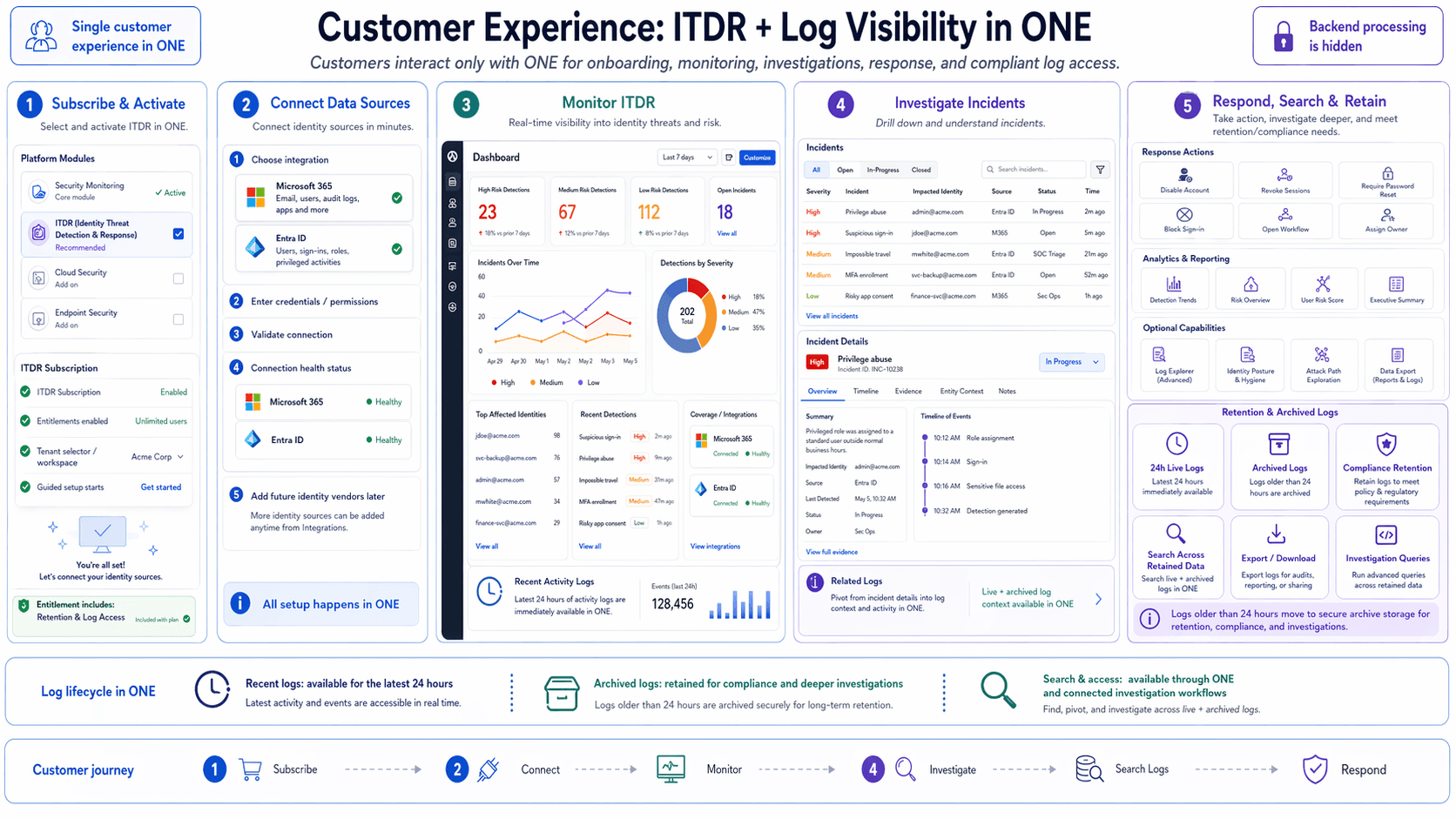
Customer Experience Overview
Customers interact with ONE for onboarding, monitoring, investigations, response, and compliant log access across a single connected workflow.
Platform At A Glance
ITDR brings setup, monitoring, investigation, response, and retention into one operator experience.
Reference visual
Original customer-experience diagram rendered at full clarity.
End-to-end flow
Subscribe & Activate
Select and activate ITDR inside ONE.
Connect Data Sources
Connect identity and activity providers in minutes.
Monitor ITDR
Track detections, trends, and affected identities.
Investigate Incidents
Drill down with timeline and incident evidence.
Respond, Search & Retain
Contain threats and keep compliance-ready log access.
1. Subscribe and activate
Security Monitoring
Core module
ITDR
Identity threat detection and response
Cloud Security
Optional add-on
Endpoint Security
Optional add-on
2. Connect data sources
Microsoft 365
Email, users, audit logs, apps
Entra ID
Users, sign-ins, roles, privileged activity
3. Monitor ITDR
Illustrative figures — not a live tenant
High Risk Detections
23
+16% vs prior 7 days
Medium Risk Detections
67
+12% vs prior 7 days
Low Risk Detections
112
+8% vs prior 7 days
Open Incidents
18
Current active incident count
4. Investigate incidents
Privilege abuse
admin@acme.com
Entra ID
Suspicious sign-in
jdoe@acme.com
M365
Impossible travel
mwhite@acme.com
Entra ID
MFA enrollment anomaly
svc-backup@acme.com
Entra ID
5. Respond and contain
Search, analytics and retention
Log lifecycle in ONE
Recent logs (24h)
Latest activity is immediately available for monitoring and investigation.
Archived logs (optional)
Tenants can connect their own S3 bucket; when enabled, raw logs are exported there on a schedule and retained under the bucket's own policy. Off by default.
Search and investigation
Operators can search live and archived data in one connected workflow.
Customer journey